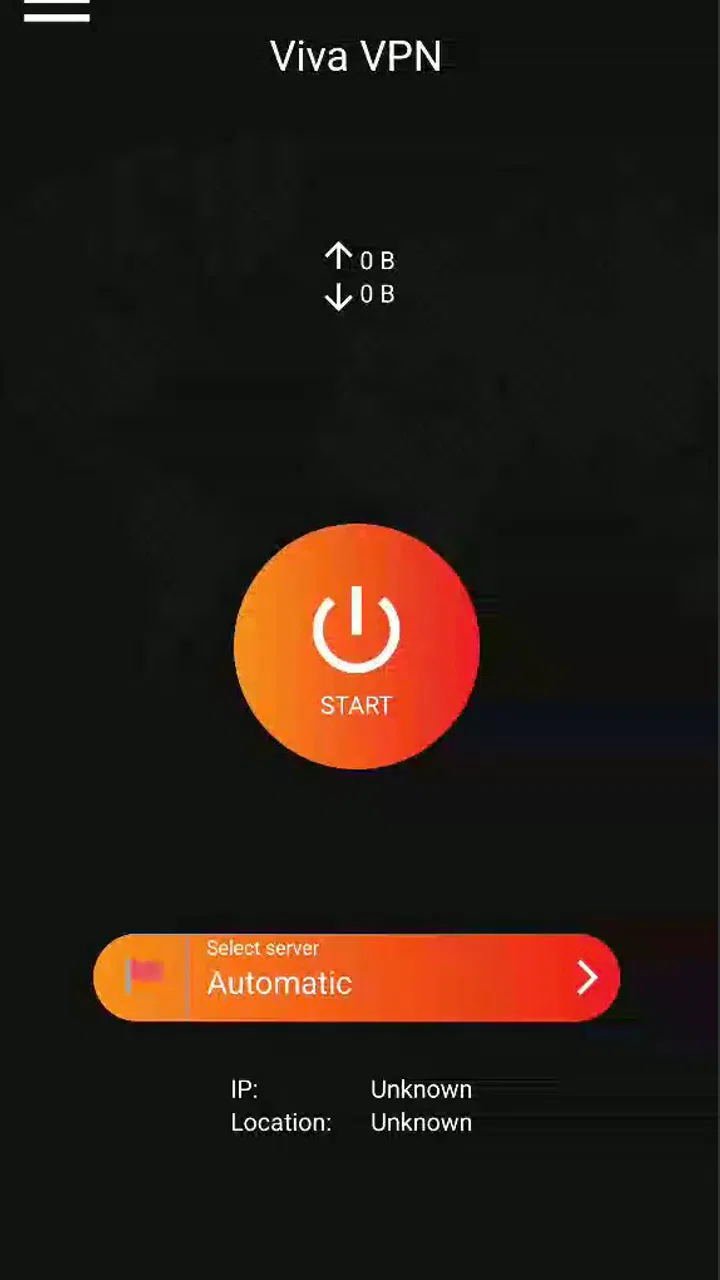
Viva VPN
- 4.3
- Rating
- 10.00M
- Installs
- Free
- Price

 Analysis by App-foxy
I usually judge a VPN twice: first by how quickly it helps, and then by whether I still want it installed after the first week. Viva VPN makes a straightforward first impression as a free tools app from Viva team, built around the simple idea of getting a fast, secure VPN connection without turning the process into a project. That simplicity is its main appeal, but it also creates the central question: does a basic VPN remain useful month after month, or does it become another icon I forget about?
My answer is cautiously positive. Viva VPN is easy to understand, free to try, and suitable for everyday privacy habits on compatible Android devices. It has reached over ten million installs and holds a 4.3 average from around fifty-two thousand ratings, which suggests that its uncomplicated approach works for a broad audience. Still, popularity alone does not make a VPN the right choice for everyone. People who need advanced control, a clearly documented privacy workflow, or specialized access options may eventually find a more configurable service a better fit.
What the first week feels like
The first-week appeal comes from the lack of ceremony. I do not want to study a VPN before using it, especially when I am connecting from a café, hotel, airport, or another shared network. Viva VPN presents itself as a practical tool rather than a complicated networking dashboard. That makes it approachable for someone who has never used a VPN and wants a quick way to add a privacy layer to ordinary browsing.
You May Also Like

 Blood Strike: 2.5 Anniversary
Blood Strike’s Loadouts Turn Every Drop Into a Tactical Gamble
A close look at Blood Strike’s custom loadouts: how fast access to signature weapons reshapes its battle royale rhythm, rewards preparation, and narrows the gap between fights.

 Pandora - Music & Podcasts
Pandora’s Music Is Easy to Start, but Harder to Recover
Pandora’s strength is its low-effort path from a seed to a station. Its weak spot is how much confidence it asks you to place in connection, setup, and quiet recovery.

 8 Ball Pool
 Is Built on Rivalries, Rematches, and Routine
A close look at the rivalries, rematches, shared routines, and unanswered safety questions that turn a quick pool match into a persistent mobile community.

 Samsung Music
’s Quiet Strength Is Playing What You Already Own
Its reach comes less from spectacle than from dependable access to a personal library. That simplicity is both the app’s strongest retention engine and its ceiling.

 AccuWeather: Weather Radar
AccuWeather Review: A Quick, Clear Forecast for Everyday Decisions
For everyday plans, the best forecast is the one you can understand quickly. AccuWeather makes rain timing, radar, and local conditions easy to act on, with a few trade-offs.

 Hill Climb Racing
Why Hill Climb Racing Still Turns Crashes Into One More Run
A tiny car, a bumpy hill and one more upgrade: Hill Climb Racing keeps resurfacing because its simple chaos makes every near-miss feel personal.
More From Our News Desk



A realistic use case is a work break in a busy café. I might connect my phone to the café Wi-Fi to check messages, review a document, or use a shopping app. In that situation, the value is not excitement; it is having a familiar routine: open the VPN, connect before doing anything sensitive, and disconnect when I leave. The app’s fast-and-secure positioning fits that habit well, provided I remember that a VPN is not a complete security system. It does not replace strong passwords, device updates, careful app choices, or sensible behavior on suspicious websites.
That distinction matters because many new users expect a VPN to make them anonymous everywhere. I would not treat Viva VPN as permission to sign into unknown services, install questionable files, or ignore browser warnings. Its useful role is narrower and more realistic: it can help protect traffic on networks I do not fully trust and make a public-network routine easier to follow.
The app is free, which lowers the barrier to testing it during that first week. I can see why that matters to casual users who do not want another subscription simply to improve their everyday connection habits. The age rating is Everyone, and the minimum operating system is Android 6.0, so it is aimed at a wide range of Android phones rather than only recent hardware. The current version is 1.2.7, a detail worth checking against the software on my own device before installing.
My first practical tip is to use it deliberately instead of leaving it running without thought. I would connect when using an unfamiliar network, then check whether essential apps still behave normally. Banking, streaming, work, and location-based services can react differently when a VPN is active. If one app suddenly asks for extra verification or shows the wrong region, the sensible response is to identify whether the VPN is involved rather than repeatedly retrying.
A second useful habit is to compare the experience in more than one place. A connection that feels quick at home may feel different on crowded public Wi-Fi, and a service that works well for browsing may be less comfortable for video calls or large downloads. Viva VPN’s first-week test should therefore include the activities I actually perform, not just opening a webpage and assuming everything is perfect.
Where the simple design helps
Viva VPN is most convincing when I need a low-friction privacy tool. I can recommend it to a friend who wants a basic VPN for occasional public Wi-Fi use but does not want to learn about protocols, routing rules, or elaborate server menus. The app’s category is Tools, and that is exactly how I would approach it: as a utility I open for a specific task, not as a service that should dominate my phone.
The same simplicity can reduce mistakes. A crowded interface often encourages people to change settings they do not understand. With a more focused tool, the ordinary workflow is easier to remember: connect, use the network, and disconnect when the situation changes. That is especially helpful for family members who need a repeatable routine rather than a long list of technical options.
There is also a useful psychological advantage to a free app. I am more likely to keep a no-cost tool available for occasional travel or emergency use than one that requires a commitment before I know whether it suits my phone. The first week is therefore not only about speed. It is about discovering whether the app fits naturally into my own behavior.
Whether it earns a place after the novelty fades
The harder test begins after the first week. A VPN has lasting value only if I have a reason to use it repeatedly and if it does not create more friction than the problem it solves. Viva VPN can earn that space for people whose recurring need is simple: safer-feeling connections on shared networks, occasional privacy while browsing, or a quick utility for travel and public access points.
For me, the strongest month-to-month pattern would be a small number of dependable routines. I might use it whenever I connect to hotel Wi-Fi, when I work from a café, or when I use a network at an event. Those situations are easy to remember because the trigger is clear. By contrast, leaving a VPN active all the time without understanding how it affects every app can create confusion, so I would not recommend treating constant use as an automatic goal.
One non-obvious trade-off is that convenience and control often move in opposite directions. Viva VPN’s approachable character is useful when I want a quick connection, but advanced users may want more say over how their traffic is handled, which apps use the VPN, or how different locations affect services. If those controls are central to my work or travel, I would compare Viva VPN with a more configurable alternative before making it my permanent choice.
Another practical question is whether it suits media and location-sensitive services. A VPN can change how a service sees my connection, and that can affect sign-in checks, recommendations, availability, or playback behavior. I would not choose Viva VPN solely to chase content from another region. For ordinary browsing and public-network use, the simpler case is clearer; for specialized regional access, a service designed and documented around that purpose may be a better match.
The app’s audience size gives it some reassurance as a mainstream option. It has more than ten million installs and around one thousand one hundred written reviews, alongside its broader rating count. I would read that as evidence that many people are willing to try it, not as proof that every connection will feel identical. Network quality depends on the phone, the local network, the destination, and the app being used, so I would judge it by repeated personal use rather than by the headline numbers.
For a month-to-month routine, I would also pay attention to whether the app interrupts what I am doing. A VPN that is easy to start but frequently needs troubleshooting will lose its value quickly. My advice is to test it during low-stakes tasks first, then use it for more important browsing only after I know how my regular apps respond. That approach prevents a last-minute connection problem from becoming a work or travel problem.
Maintenance is small, but not zero
Viva VPN does not look like the kind of app that demands constant attention, and that is a strength. A utility earns trust when I can return to it after days away and understand what to do immediately. Still, the maintenance burden is not completely absent. I would keep the app updated through the normal Android process, revisit its behavior after major phone or network changes, and remove it if I stop using it rather than allowing unused software to accumulate.
The most important maintenance task is behavioral, not technical: remembering when the VPN is active. If I leave it connected, some services may behave differently, and I may blame the wrong app when a login or location check changes. If I disconnect too quickly, I may use an unprotected public network for the task I meant to protect. A simple start-and-finish routine helps: connect before opening sensitive services, complete the task, then decide whether the connection should remain active.
I would also avoid assuming that a VPN automatically improves every connection. Sometimes the extra routing step can make an activity feel less responsive, particularly when the original network is already fast. For email, reading, and basic browsing, that trade-off may be barely noticeable. For a live call or an activity that depends on precise location, I would test both states and choose the one that works reliably.
There is a useful difference between a tool I need every day and one I want available when circumstances change. Viva VPN may be more valuable as a travel and public-network companion than as a permanent background habit. That is not a weakness by itself. In fact, occasional tools can be easier to trust when I understand exactly why I am opening them.
What may cause fatigue over time
The first source of fatigue is repetition without a clear benefit. If I mostly use secure home networks and rarely connect to public Wi-Fi, I may open Viva VPN so infrequently that it becomes forgettable. A free installation costs little, but unused apps still occupy attention. I would keep it only if it supports a real routine, such as frequent travel, shared workspaces, or regular use of networks I do not control.
The second source is uncertainty. VPN users often want to know what is happening behind the connect button, especially when privacy is the main reason for installing the app. A simple interface is friendly, but it can feel limiting if I want deeper explanations or more detailed controls. This is where I would be honest with a technical friend: Viva VPN may be a comfortable starting point, while a more transparent and configurable service could be preferable for professional privacy needs.
The third is compatibility friction. Some apps are sensitive to changed network routes, and some websites challenge unfamiliar connections. If my daily work depends on location-aware tools, corporate access, financial services, or stable real-time communication, I would test Viva VPN carefully before relying on it. The right decision is not “VPN always on” or “VPN never on”; it is choosing the mode that keeps the important task dependable.
I would also skip it if I am looking for a complete privacy strategy. A VPN does not stop phishing, protect a weak account password, or make an unsafe download safe. It can be one layer in a broader routine, but it should not become a substitute for device security. That is an important limitation for beginners, because the convenience of a single button can create an exaggerated sense of protection.
Compared with the usual alternatives in the VPN category, Viva VPN’s strongest difference is its low commitment. Traditional paid VPN services often appeal to users who want a larger feature set, more detailed settings, or a long-term plan built around frequent use. Viva VPN is easier to consider when the need is occasional and the budget is zero. The trade-off is that someone seeking specialized control may outgrow its straightforward approach.
My long-term verdict
After the novelty fades, I see Viva VPN as a practical occasional utility rather than an app everyone must keep active all day. Its free price, broad Android compatibility, approachable purpose, and strong adoption make it easy to recommend as a trial for casual users. The developer, Viva team, has positioned it in a space where clarity matters more than technical showmanship, and that works well for people who want a quick privacy step on shared networks.
I would recommend it to a student using campus or café Wi-Fi, a traveler moving between hotels and public hotspots, or a family member who needs a simple VPN routine. I would tell those users to test their most important apps, learn how to recognize when the connection is active, and treat the VPN as one part of safer browsing rather than a magic shield.
I would not make it my first choice for advanced networking needs, highly specialized location requirements, or a work environment where detailed configuration and documented privacy practices are essential. In those situations, paying for a more configurable alternative may be worthwhile because the extra control solves a real problem rather than adding decoration.
Ultimately, Viva VPN earns lasting space when it is tied to a repeatable situation. If I regularly use networks I do not control, its quick access and no-cost entry can justify keeping it installed. If I rarely need that protection, the app may remain unused after the initial curiosity. That makes the final verdict personal but clear: it is a sensible, accessible tool for occasional VPN use, with enough everyday value to keep, as long as I understand both its convenience and its limits.
FAQs for Viva VPN
01What is Viva VPN and how does it work?
Viva VPN is a virtual private network app designed to secure your internet connection and protect your online privacy. It encrypts your data, making it difficult for hackers or snoopers to access your information. By connecting to different servers worldwide, it also allows you to bypass geo-restrictions and access content that may be unavailable in your region.
02Is Viva VPN free to use, or are there subscription options?
Viva VPN offers a free version with basic features, which is suitable for casual browsing. However, for advanced features such as faster speeds, more server locations, and enhanced security options, a subscription may be required. These paid plans typically offer a better overall experience and unlock the app's full potential.
03How secure is Viva VPN in protecting my online privacy?
Viva VPN employs high-level encryption protocols to ensure your data is secure. It also provides features like a kill switch, which disconnects your internet if the VPN connection drops, preventing data leaks. Additionally, the app has a strict no-logs policy, ensuring that your browsing history and personal information are not stored or shared.
04Can I use Viva VPN on multiple devices simultaneously?
Yes, Viva VPN allows users to connect multiple devices at the same time, depending on the subscription plan. This is particularly useful if you want to secure your internet activity across smartphones, tablets, and computers. Ensure you check the specific plan details to know the exact number of devices supported.
05Will using Viva VPN affect my internet speed?
While using a VPN can potentially slow down your internet speed due to encryption processes, Viva VPN is optimized to minimize this impact. Premium users often experience faster speeds due to access to more servers and less congestion. If speed is a concern, consider choosing a server location closer to your actual location for better performance.
Pros
- Fast connection speeds enhance browsing experience.
- User-friendly interface for easy navigation.
- Multiple server locations for global access.
- Strong encryption ensures online privacy.
- No-log policy protects user data.
Cons
- Limited free version features.
- Occasional connection drops reported.
- Ads in the free version can be intrusive.
- Some servers have slower speeds.
- Premium plans can be pricey.

Viva VPN
Gallery